
Software for Pakistan
Clinic appointment and token queue software
in Pakistan.
Bring scheduled visits, walk-ins and the patient file into one reception workflow. Ali Clinic Flow helps Pakistani clinic teams organise who is booked and who has arrived.
From Rs. 3,000/month · Optional AI is separate
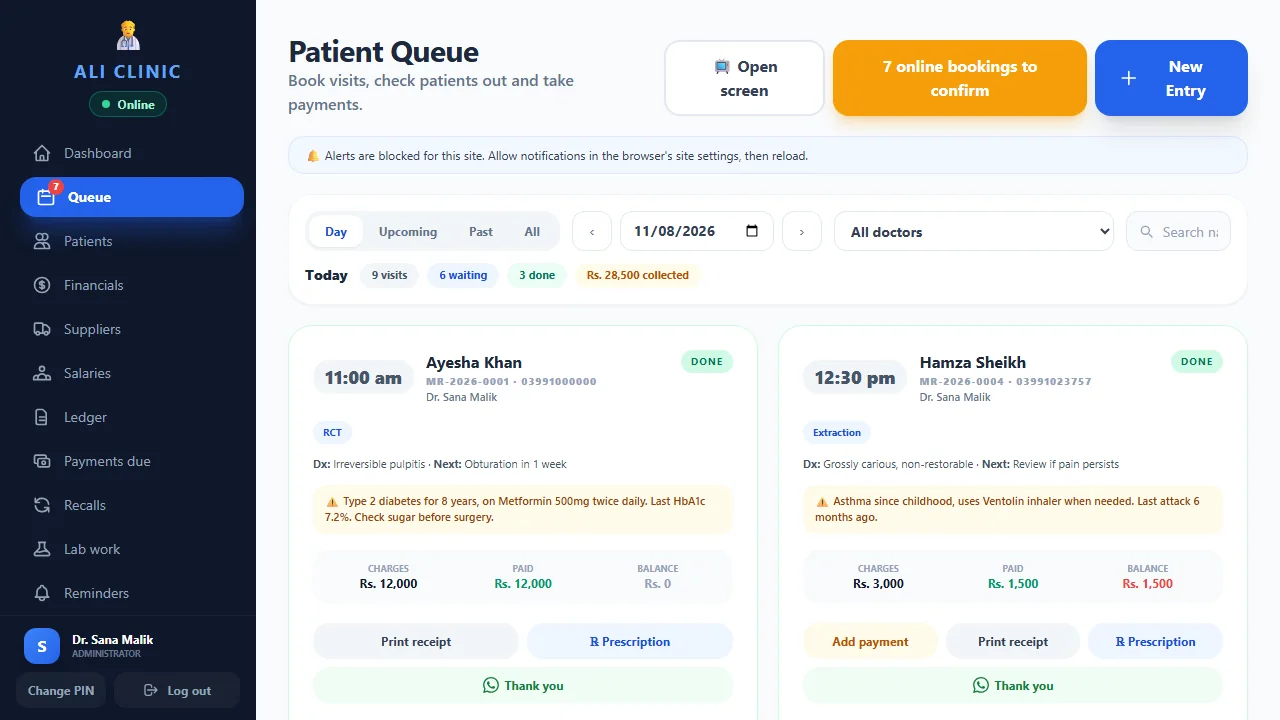
How does Clinic Flow organise appointments and tokens?
Ali Clinic Flow combines clinic appointments, queue and tokens with patient records and payments. Reception can organise visits without maintaining a separate paper queue as the only reference. Core plans start at Rs. 3,000/month for up to two doctors. Optional AI online booking reception and automatic messaging have separate requirements.
01 / Appointments & token queue
From a booked appointment to an arrived patient
An appointment is a planned visit; a queue represents patients who have arrived. Keeping those steps clear helps reception avoid treating a future booking as someone already waiting. Test both a scheduled patient and a walk-in during your software demo.
Start by finding the patient record, checking the intended doctor and reviewing the appointment. Then demonstrate check-in, the queue and the token workflow. Ask the receptionist who normally handles arrivals to perform the steps so you can see where guidance is needed.
02 / Appointments & token queue
Test a real reception scenario
A useful demonstration includes more than one patient. Use fictional records and repeat a busy moment from your clinic day. Software can make the order visible, while your staff still decide how to handle late arrivals, urgent needs and changes to the schedule.
- Book a follow-up appointment for one fictional patient.
- Add a second patient as a walk-in.
- Check the appointment patient in and review the queue.
- Demonstrate the token slip and waiting-room display on your equipment.
- Open the correct patient record before the consultation.
- Record the visit payment and arrange the next appointment.
This is a trial checklist, not a promise of shorter waiting times. Appointment lengths, staffing and clinical priorities also determine how a waiting room runs.
03 / Appointments & token queue
Understand what a WhatsApp reminder includes
Clinic Flow supports one-tap, staff-sent WhatsApp reminders. A staff member opens the message and sends it. Automatic delivery is a different setup: it requires the official WhatsApp Business API, configuration and discussion of any provider charges.
Ask to see the reminder your receptionist would send, how the appointment details appear and what the patient sees. Confirm your clinic policy for contact details and messages before using real patient information. Do not assume a core subscription includes unattended WhatsApp campaigns.
04 / Appointments & token queue
Add online booking reception when it fits your team
The optional AI add-on includes online booking reception and Urdu or English voice-to-text dictation. It costs Rs. 1,500/month separately and is excluded from the 14-day core trial. Start with the appointment and queue workflow, then discuss how an online booking should fit your doctor schedule.
Before enabling an additional booking channel, agree who reviews incoming appointments and how reception handles changes. Ask for a demonstration of your specific requirements instead of assuming every booking channel has the same behaviour. See the AI feature details.
05 / Appointments & token queue
What to confirm before changing your reception system
Check your doctor count, sign-in permissions, printer and waiting-room display needs. Clinic Flow is the online clinic product; test connectivity loss and recovery on the devices you plan to use rather than assuming every function works without a connection. Read the setup guide for the next steps.
Core plans cost Rs. 3,000/month or Rs. 30,000/year for up to two doctors. Three-or-more-doctor plans start at Rs. 5,000/month or Rs. 45,000/year. Confirm larger-team pricing, optional services and migration work in writing. Use the 14-day core trial to repeat the reception scenario with staff before switching.
06 / Appointments & token queue
What is the difference between an appointment and a token?
An appointment records a planned visit, usually against a doctor and time. A token helps the clinic organise arrivals. The two are connected, but they answer different questions: who is expected, and who is here now? Reception needs both views when booked patients and walk-ins arrive during the same session.
Imagine a patient booked for the evening who has not arrived, a walk-in waiting at reception and a returning patient who arrived early. The software should be demonstrated with that kind of scenario. Ask the receptionist to explain how the clinic will check in each person and how the doctor will open the correct record. Agree the clinic's ordering rules separately from the software.
This distinction matters when searching for clinic appointment software or a patient token system in Pakistan. A booking calendar alone may not answer your queue questions, while a token list alone may not organise future visits. Ali Clinic Flow brings appointments, queue and tokens into the wider patient workflow, so you can evaluate those steps together in a core demo.
07 / Appointments & token queue
Walk through a busy session before you choose software
Use three fictional patients and two different arrival patterns. One has an appointment, one arrives without a booking and one needs to change an existing time. Add the doctor schedule you would normally use. This is enough to make a demonstration realistic without sharing actual patient information or trying to recreate an entire working day.
Ask reception to work through the scenario while another colleague watches from the doctor's perspective. Check where appointment information appears, how the correct patient is identified and what the team does after the visit. If you use a token slip or waiting-room screen, demonstrate those on the equipment you intend to use. Printer and display assumptions are easier to resolve before a purchase.
Finally, ask someone who missed the demonstration to repeat the process with brief guidance. Their questions reveal whether you need a clearer entry procedure, a training session or a product setting explained. Keep the same scenario when comparing suppliers. You will learn more from a repeatable exercise than from several unrelated tours of attractive dashboards.
08 / Appointments & token queue
Planning appointments for more than one doctor
A multi-doctor clinic needs to know whose appointment is being booked and which session the patient expects. Start with your real scheduling rules: the doctors' working days, different session lengths and the receptionist responsible for changes. Bring those rules to the demonstration rather than assuming a general calendar will match every arrangement automatically.
Ask your team to book fictional visits for different doctors and locate them again. Then test a moved appointment. Check the available doctor filters and how staff confirm the intended clinician when opening the patient record. If your practice needs a particular room, branch or department arrangement, ask for that exact requirement to be demonstrated and quoted.
The published core plan covers up to two doctors at Rs. 3,000/month or Rs. 30,000/year. Plans for three or more doctors start at Rs. 5,000/month or Rs. 45,000/year, with larger teams quoted individually. Your scheduling needs and doctor count should both be clear in the final agreement. A starting price should not be read as a fixed quotation for every size of practice.
09 / Appointments & token queue
Find the right patient before creating another record
Reception often receives incomplete information: a first name, an old phone number or a relative calling on the patient's behalf. Agree the details your team will use to identify an existing patient before creating a new file. Consistent entries make future appointment searches and handovers easier.
Test that process with fictional patients who have similar names. Ask reception to search using the identifiers it normally has available and verify the correct record before booking. Check how the team reviews a previous visit or an outstanding balance when needed. Do not assume that every record with a matching name represents the same person.
When moving from paper or a spreadsheet, decide how existing record numbers will be handled and clean obvious inconsistencies in the source file. Discuss a redacted sample with the setup team before agreeing migration work. A good queue process starts with the right patient record; otherwise, a tidy list can still send staff to the wrong history. Keep patient identity checks as part of staff training, even after everyone is comfortable with the software.
10 / Appointments & token queue
Build a reminder process your receptionist can explain
Start by deciding when your team will send a reminder and which details it should contain. A patient needs enough information to recognise the appointment and contact the clinic if plans change. Staff should also know how to handle a reply or an incorrect phone number. Those are operating decisions as much as software settings.
In Clinic Flow, one-tap staff-sent WhatsApp reminders require a staff member to open and send the message. Ask the receptionist to demonstrate that step with fictional contact details. Make sure the wording fits your clinic and the intended appointment. Avoid placing unnecessary clinical information in a routine booking message.
If you want unattended delivery, discuss the official WhatsApp Business API setup separately, including configuration and any provider charges. Confirm the available behaviour rather than assuming a one-tap link is an automated campaign system. During the trial, measure whether the staff process is clear and repeatable. A feature is useful only when the team knows who owns it and what to do when the message does not lead to a confirmed visit.
11 / Appointments & token queue
What should you test when the internet connection drops?
Clinic Flow is the online clinic product. Installation on a supported device does not, by itself, tell you which workflows remain available during an outage. Before relying on it at reception, ask for a clear explanation of connectivity requirements and test the steps that matter on the actual devices you plan to use.
Choose a fictional record and a quiet evaluation session. Check what the installed app can open, what it can record and how it behaves when the connection returns. Ask which actions depend on online services. Keep the test coordinated with the setup team so you understand the intended recovery process rather than drawing conclusions from a single interrupted screen.
Also decide what reception will do if a device or printer becomes unavailable. The clinic should have a simple continuity procedure and a way to reconcile any temporary records afterwards. This is a planning exercise, not a claim that every cloud feature operates offline. Ali Pharmacy POS is a separate Windows product with its own offline daily pharmacy workflow; its behaviour should not be assumed to describe the clinic software.
12 / Appointments & token queue
Keep clinical priorities and staff responsibilities clear
A token number provides an administrative reference. It should not replace the clinic's process for recognising an urgent clinical concern or asking a clinician for help. Agree who handles those situations and how reception explains changes in the order to waiting patients. Software does not make the clinical judgement.
For routine work, assign responsibility for booking, check-in, rescheduling and the next appointment. A small team may share those tasks, but it still helps to know who checks unfinished work before the session closes. Use individual sign-ins and test permissions against the responsibilities you have assigned. Read the staff access information before entering live records.
Review the waiting-room display and token output during the demo with your own privacy expectations in mind. Check which information is visible and where the screen or printout will be used. Explain the agreed process during staff training. A consistent handover between reception and the doctor usually matters more than adding another screen that nobody is responsible for checking.
13 / Appointments & token queue
How to evaluate the queue workflow during the core trial
Pick a few questions you can answer by the end of the 14-day trial. Can reception distinguish future bookings from arrived patients? Can the doctor open the intended file? Can a colleague continue the process when the usual receptionist is away? Use fictional records until your practice has agreed permissions and its approach to entering live information.
Repeat the same arrival scenario on more than one day. Note where staff ask for help and whether a short explanation resolves the problem. Check the payment and follow-up steps as well as the queue itself. Reception does not work in isolation, so the handover into the patient record and back to the next booking deserves attention.
Before subscribing, review the unresolved questions with the support team and confirm your plan in writing. Include doctor count, equipment needs, migration scope and any optional booking or messaging services. The core trial excludes AI, so arrange discussion of the optional add-on separately. Your decision should rest on a workflow the team has actually used, with clear responsibilities and a manageable setup plan.
A few useful answers
Before you decide.
Tell us how your team works. We’ll walk through the details with you.
Ask on WhatsAppCan I manage appointments and walk-ins together?
Clinic Flow includes appointments, queue and tokens. Demonstrate a scheduled visit and a walk-in together to check the workflow against your reception process.
Are automatic WhatsApp reminders part of the core plan?
One-tap staff-sent reminders are supported. Automatic delivery requires the official WhatsApp Business API and configuration. Confirm setup and provider charges separately.
Does queue software guarantee shorter waiting times?
No. A visible queue helps staff organise arrivals, but waiting times also depend on appointment lengths, staffing and clinical priorities.
Let’s make it practical
See how your clinic day could flow.
Bring your questions. We’ll show you the software, explain the plans and help you choose.