
Software for Pakistan
Dental clinic software in Pakistan,
built around the treatment plan.
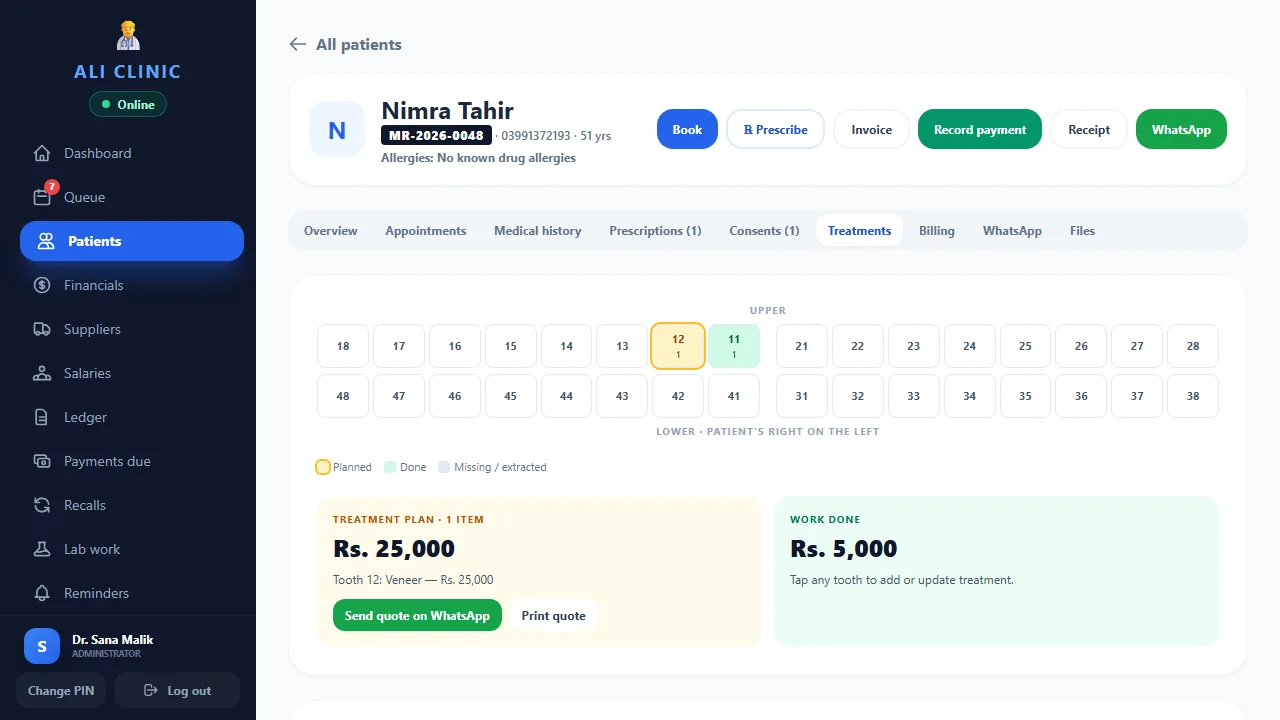
Connect the tooth chart, proposed treatment, next appointment and patient balance in Ali Clinic Flow. Give reception and the dentist a shared record of the work ahead.
From Rs. 3,000/month · Optional AI is separate
What does Clinic Flow include for dental practices?
Ali Clinic Flow is dental clinic management software for practices in Pakistan. It brings patient records, a dental chart, treatment plans, quotations, appointments and payments into one clinic workflow. Core software starts at Rs. 3,000/month for up to two doctors, with a 14-day free trial. Optional AI is charged separately.
01 / Dental clinic software
Start with the patient and the tooth chart
A returning patient should not need a new file for each stage of care. Open the existing patient record, review earlier visits and use the dental chart alongside the treatment plan. Keep relevant images and documents with the patient so the dentist can review the record before continuing.
The software organises the record; the dentist decides what the chart means and which treatment to recommend. In your demo, use a fictional patient and ask the dentist to record a proposed treatment, find an earlier attachment and explain the plan to reception.
02 / Dental clinic software
Make a staged treatment plan easier to follow
Dental work can span several appointments. Record the proposed work and quotation, then use follow-up bookings to organise the next visit. A written estimate gives the team a reference when a patient asks what was discussed or what remains to be paid.
- Find or create a fictional patient and open their dental chart.
- Record the proposed treatment and prepare a quotation.
- Book the next appointment with the appropriate doctor.
- Record a part payment and review the outstanding balance.
- Return to the same patient file at the next visit.
Try the complete sequence with your receptionist during the core trial. Check how your practice handles changed plans, deferred work and payment arrangements before moving live records.
03 / Dental clinic software
Keep treatment quotations and patient payments connected
A treatment quotation and a payment are different events. A patient may accept work and pay in stages; the team needs to see what was quoted, what has been received and what is still outstanding. Clinic Flow includes treatment plans, quotes and payments within the clinic workflow.
Use a sample quotation of Rs. 12,000 and a first payment of Rs. 4,000 in the demo. Ask staff to locate the remaining Rs. 8,000 and the payment record. These figures are a fictional workflow example, not a treatment price or a clinical recommendation.
For a more detailed walkthrough, read our guide to dental treatment plans and payments.
04 / Dental clinic software
Check the workflow for the dentist, reception and owner
Use individual staff sign-ins and review permissions before entering patient information. The person making appointments may need different access from the person reviewing finances or changing clinic settings. Test the actual accounts your team will use rather than judging every screen through an owner login.
For a practice with several doctors, test appointments against your normal schedule and confirm the doctor count in the quotation. Read about data and staff access and the backup and restore process before starting your migration.
05 / Dental clinic software
Dental software pricing and the core trial
Core Clinic Flow costs Rs. 3,000/month or Rs. 30,000/year for up to two doctors. Plans for three or more doctors start at Rs. 5,000/month or Rs. 45,000/year, with a quotation for larger teams. Setup and staff guidance are included; large record migrations are quoted separately after review.
The 14-day trial covers core software. Optional AI dictation and online booking reception cost Rs. 1,500/month separately and are excluded from that trial. A doctor must review clinical drafts. Check the published plans and confirm your final scope before subscribing.
06 / Dental clinic software
What should dental software make easier on an ordinary day?
Think about the questions your team answers repeatedly. When is this patient coming back? Which work did the dentist propose? Was the amount on the quotation paid in full, or was it the first instalment? A useful dental system lets the team find the relevant record without reconstructing the story from a diary, a receipt book and a WhatsApp conversation.
That is a practical way to evaluate dental clinic software in Pakistan. Begin with your busiest routine, whether that is evening reception, a returning patient with several visits, or the owner checking balances after the last appointment. Choose a task you can repeat during the trial. Write down which record you expect to find and who should be able to open it.
Do not judge the system only by the number of items on its feature list. Ask your receptionist to find a returning patient while the dentist reviews the treatment plan. Ask the owner to locate the associated payments. If everyone can explain where their information lives, you have a stronger basis for deciding whether the workflow suits your practice.
07 / Dental clinic software
A fictional case: one plan, three visits and two payments
Consider a fictional patient, Sara, whose proposed work will take three visits. The example is about administration, so there is no need to decide a diagnosis or invent a clinical treatment. Give Sara a record, add a proposed plan and prepare a sample quotation. The dentist should recognise the clinical record; reception should understand the booking and payment steps.
At the first visit, record an initial payment and arrange the second appointment. Before that appointment, ask a different authorised staff member to find Sara's file. Can they identify the next booking and locate the quotation without asking the original receptionist? After another payment, ask the owner to review the payment history and remaining balance.
Now change the scenario. Sara calls to move the third visit. Ask your team to demonstrate its usual rescheduling process and explain how it will keep the treatment record accurate. This exercise exposes questions that a polished sales demonstration can miss. It also gives you a small training exercise to reuse with new staff. Keep Sara's details fictional throughout the evaluation and agree your real record-entry procedure before launch.
08 / Dental clinic software
How do you keep dental patient records useful over time?
A searchable patient list depends on consistent entries. Decide how the team will record names, phone numbers and any existing record number before importing files or entering new patients. Two slightly different spellings can make a returning patient harder to find. A shared entry procedure is often more useful than asking staff to remember a growing list of exceptions.
During the trial, create several fictional records with similar names. Ask reception to find the correct person using the information it normally receives on a call. Then check how the dentist finds earlier visit notes and attachments. The aim is to understand the available search and review steps, rather than assuming every kind of document can be searched in the same way.
Keep the record clear enough for another authorised colleague to follow. A short, understandable visit entry is easier to use than an unexplained abbreviation or a note saved in the wrong place. Clinical content remains the dentist's responsibility. Software provides a place to organise it; your practice still needs a consistent approach to entering, checking and correcting information.
09 / Dental clinic software
Moving from a paper register or spreadsheet without losing context
You do not need to digitise every historical page on the first morning. Begin by listing the records the team needs for current appointments, active treatment plans and outstanding balances. Separate that operational list from older material you may need to retain. Agree the transition with the practice owner before anyone starts copying information.
Prepare a redacted sample of your spreadsheet when discussing migration. Ask which fields can be moved, which need cleaning and which require manual entry. Large record migrations are quoted separately after review, so confirm the work in writing. Do not treat an estimate for installing software as an agreement to reconstruct every historical file.
Choose a starting date and reconcile the opening balances. For each active plan, check that the proposed work, payment history and remaining amount make sense together. Keep a clear reference to the original source during the transition. Use a small, agreed batch to verify the process before expanding it. This gives the dentist, reception and owner a chance to identify missing context while the source records are still easy to consult.
10 / Dental clinic software
Who should see the schedule, clinical record and finances?
Start with responsibilities rather than job titles. A receptionist may organise appointments and collect payments, while a dentist reviews clinical information and an owner checks the financial picture. Your exact arrangement may be different, particularly in a small practice where one person covers several tasks. Write down the access each person needs to do their work.
Then test that arrangement with individual accounts. Open the appointment workflow as reception, review the patient record as the clinician and check settings using an owner or administrator account. Verify the actual permissions available in the product. Do not assume a role name proves that every screen behaves as your practice expects.
Shared credentials make it harder to know who should update a record or handle a problem. Agree who creates accounts, who changes permissions and what happens when a staff member leaves. Discuss backups and recovery responsibilities at the same time. The data and access page explains the product's approach, and a demo is the right place to confirm any requirement specific to your team.
11 / Dental clinic software
Where Urdu and English dictation can fit into a dental visit
Typing is not every clinician's preferred way to make a draft. The optional AI add-on supports Urdu or English voice-to-text dictation and online booking reception. If dictation interests your practice, prepare a short fictional note containing the terms and speaking style you would normally use. Ask to see the draft and the review step, rather than evaluating the feature from a promise about speed.
The dentist must check clinical drafts before using them. Names, numbers, medicine details and the intended wording need attention even when a draft sounds fluent. Decide where that review happens in your workflow and who approves the final record. Do not use unreviewed output as a substitute for the clinician's judgement.
AI is optional and costs Rs. 1,500/month separately from core Clinic Flow. It is excluded from the 14-day core trial. Ask how an AI demonstration can be arranged and discuss processing questions before enabling the add-on. A clinic can first evaluate charts, appointments, treatment plans and payments, then decide whether dictation is useful enough to add.
12 / Dental clinic software
Compare the total cost of a dental software subscription
A monthly price is only one part of the decision. Confirm the doctor count, billing period, setup guidance and migration scope. Ask whether any services you want require a separate provider or configuration. One-tap staff-sent WhatsApp reminders and automated delivery have different requirements; automatic delivery uses the official WhatsApp Business API and may involve provider charges.
For up to two doctors, twelve monthly core payments of Rs. 3,000 total Rs. 36,000. The published annual core plan is Rs. 30,000. These figures compare the billing options for this product, not the average cost of dental software across Pakistan. If you keep the optional Rs. 1,500/month AI add-on for twelve months, that adds Rs. 18,000 separately.
Use the written quotation to check the final arrangement. Read the cancellation and refund terms before paying, and confirm how the practice can obtain its records if its needs change. A clear purchase decision should explain both the tasks the system supports and the responsibilities your team will take on after setup. Price comparisons are more useful when the included work is comparable.
13 / Dental clinic software
A practical plan for your 14-day core trial
Give the trial a small set of goals. In the first few days, have reception practise finding patients, booking appointments and recording arrivals. Let the dentist work with a fictional chart and treatment plan. Once those steps feel familiar, add a quotation, a part payment and a follow-up visit so the team sees the complete sequence.
Use the middle of the trial to test handovers. Ask a colleague who did not create the fictional record to find the next appointment and balance. Review the account permissions, demonstrate a backup and discuss recovery. Keep a short list of questions and resolve them with the support team instead of building workarounds around an unfamiliar setting.
Before the trial ends, review the results together. Which tasks worked as expected? Which require training or a confirmed setup change? What remains outside the product's scope? Use those answers to agree the plan, migration work and starting date. The purpose is to make an informed purchase with a workflow your team understands, rather than simply finishing a checklist of screens.
A few useful answers
Before you decide.
Tell us how your team works. We’ll walk through the details with you.
Ask on WhatsAppDoes Ali Clinic Flow include a dental chart?
Yes. Core Clinic Flow includes a dental chart, patient files, treatment plans, quotes and payments. Test your own dental workflow with fictional records during the demo or core trial.
Can a dental clinic record part payments?
Yes. Payments and outstanding balances form part of the clinic workflow. Ask the team to demonstrate a quotation, a first payment and the remaining balance.
Is AI included in the dental software trial?
No. The 14-day trial covers core Clinic Flow. AI is an optional Rs. 1,500/month add-on, separate from the trial and core subscription.
Let’s make it practical
See how your clinic day could flow.
Bring your questions. We’ll show you the software, explain the plans and help you choose.