
The short answer
Move a clinic from paper records in stages: list existing records, agree what to migrate, test a small sample, set staff permissions and train the team on a complete visit. Reconcile opening patient balances and confirm backup recovery before relying on the new workflow. Keep original records under the clinic’s retention arrangements.
What should you prepare before migration?
List the places where information currently lives: appointment registers, patient folders, spreadsheets, payment books and scanned reports. Identify the person responsible for each source and separate active records from older archives.
Prepare a redacted sample before discussing migration with a supplier. A sample reveals duplicate names, inconsistent dates, missing record numbers and unclear balances without sharing a full patient database at the first conversation.
- Doctor and staff counts, roles and device details
- Patient identifiers and how duplicates are currently recognised
- Future appointments and active treatment plans
- Opening balances with supporting payment records
- Reports or images that need to remain attached to files
Should you import every historical record at once?
Agree on a scope that the clinic can verify. One possible approach is to begin with active patients, future appointments and checked opening balances, while retaining an organised archive for older records. Whether that approach suits your practice depends on your recordkeeping needs and responsibilities.
Do not assume a spreadsheet can be imported unchanged. Ask which fields and attachments can be moved, how duplicates are handled, what requires manual work and who signs off the result. Large Ali Clinic Flow migrations are quoted separately after review.
For a fictional example, two entries named “Sample Patient” may be different people. Matching by name alone could combine the wrong records. Have authorised clinic staff resolve ambiguous identities using appropriate existing identifiers before approving the migration.
What should happen before the first live day?
- Approve a sample: compare imported files against the agreed source records and document errors.
- Check balances: reconcile starting amounts with receipts and the clinic’s financial records.
- Set access: create individual accounts and test reception, doctor and administrator permissions.
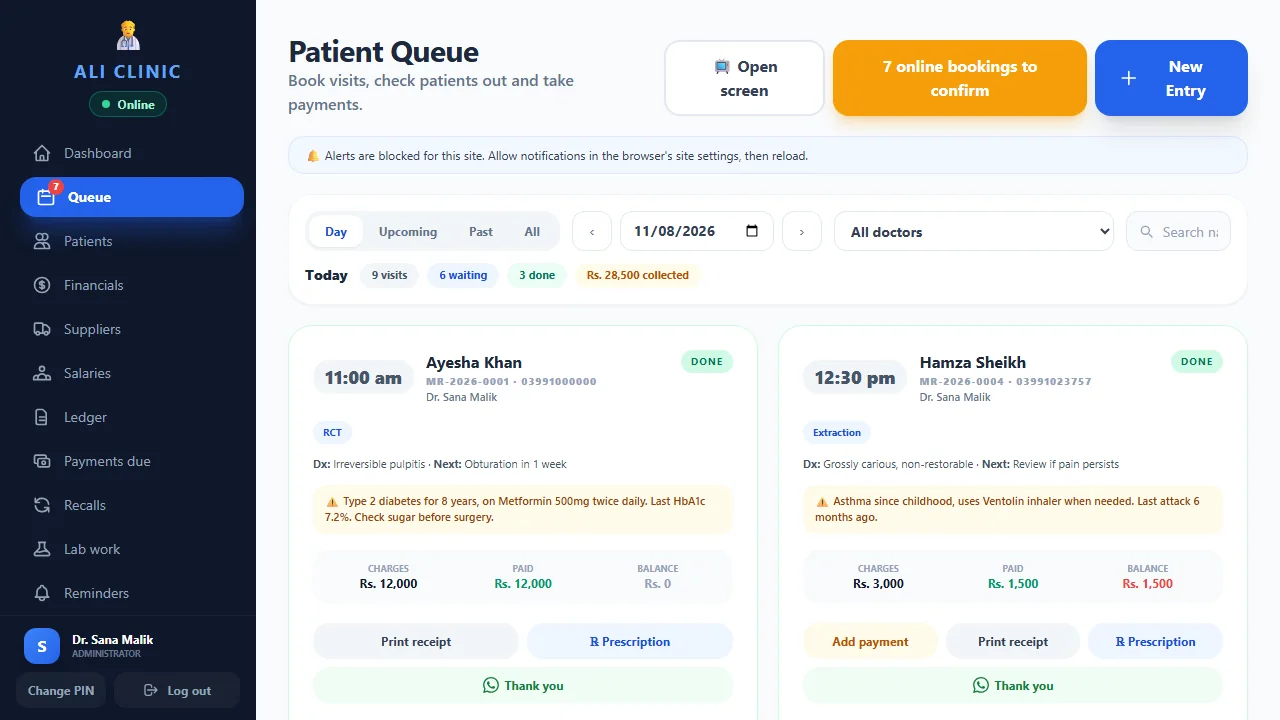
- Rehearse a visit: book, check in, open the file, record payment and close the day using sample data.
- Choose the switch date: name who handles corrections and how new entries will be recorded during the transition.
Avoid maintaining two competing current balances indefinitely. Agree which record is authoritative after the switch and how corrections will be checked.
Who should own the move from paper to clinic software?
Name one person to coordinate the change and identify who approves clinical, financial and administrative details. The coordinator does not need to perform every task. Their role is to keep the scope, questions and approvals visible so the migration does not depend on several informal conversations with different staff members.
Ask reception to explain how returning patients are found and appointments are booked. Ask doctors which historical material they need to continue visits. Ask the owner or authorised accounts person to identify the source of opening balances. These perspectives may reveal that the clinic has several records serving different purposes, even when all of them are called “the register”.
Write down the intended outcome before choosing a switch date. For example, the team may want active patient files, future bookings and checked balances ready for a staged start. Attach unresolved requirements to a named person and an agreed review point. This gives the supplier a stable scope and gives the clinic a clear way to decide when the preparation is complete.
How do you prepare a clean migration sample?
Create a small data dictionary that explains each source column or paper field. Identify which value is the clinic’s record number, which dates represent visits or payments and how balances are calculated. If abbreviations appear in a spreadsheet, have an authorised team member explain them rather than leaving the supplier to guess.
Use a redacted sample that represents the difficult cases as well as the easy ones. Include a missing value, two similar names, a changed telephone number and a patient with several receipts. A perfectly cleaned sample may hide the work required for the full dataset, which can lead to a quote or migration plan based on the wrong assumptions.
Agree the required output for each field. Some information may fit a supported structured field, some may remain as a reference note and some may belong in an archive outside the initial import. Confirm what happens to attachments separately. Once the mapping is agreed, preserve the sample and mapping notes as the reference for checking the larger migration.
How should duplicate and incomplete patient records be handled?
Give identity questions to authorised clinic staff before approving a combined record. Two similar names do not prove that the entries describe the same person. A shared telephone number may belong to a family, and an old number may have changed. Use the clinic’s established identification process and supporting records to resolve ambiguous cases.
Keep uncertain records on an exception list. Record what needs clarification and who is responsible for checking it. Do not fill missing values with guesses simply to make every spreadsheet cell look complete. An explicit unresolved field is easier to review than a plausible but incorrect identifier that later appears authoritative.
Ask the supplier how the product represents existing record numbers and whether any duplicate-handling or correction workflow is supported. Confirm the effect of a correction on visits, attachments and payments before using it. The purpose of preparation is to preserve the right relationships between records. A large import that completes without errors can still be wrong if the source identities were misunderstood.
How do you verify opening balances before the first collection?
Choose a clear financial cut-off and identify the source records used to calculate each opening balance. Separate quoted treatment amounts, receipts already received and any agreed adjustment. Have an authorised clinic team member review the calculation so the new system starts from a position the clinic can explain.
In a fictional example, a patient has an agreed quote of Rs. 20,000 and two verified receipts totalling Rs. 12,000. The opening balance is Rs. 8,000, assuming no other agreed adjustment. Importing Rs. 20,000 as outstanding would overstate the amount due; importing only the last receipt would answer a different question entirely.
Compare a sample of balances individually and reconcile the overall totals to the agreed source. Investigate discrepancies rather than using a balancing adjustment to force agreement. Record any exception that cannot be resolved before the switch and define how staff should handle it. Reception should not collect against a disputed opening figure without the responsible team member checking the supporting records.
What should staff rehearse before the software becomes the working record?
Run a complete fictional visit with the actual people who will use the software. Reception finds or creates the appropriate sample file, books a visit and checks the patient into the queue. The doctor reviews the file and enters the relevant sample record. Reception then records a fictional payment and the owner checks the day-end result.
Repeat the exercise with exceptions: a returning patient whose spelling differs, a rescheduled appointment, a part payment and an incorrect entry that needs the supported correction process. Have staff explain the next step rather than memorising a sequence of clicks. This shows whether they understand the workflow and their own permissions.
Use individual sign-ins during the rehearsal. A session conducted entirely through an owner account does not test reception’s real working environment. Record training questions and product questions separately, then ask the setup team to resolve them. The published core trial provides a period for this evaluation; agree activation, dates and sample-data arrangements before the rehearsal begins.
How should the clinic organise the first live day?
Choose the switch date around the clinic’s workload and staff availability. Confirm that the approved data, accounts and required devices are ready. Name the person who will answer staff questions and the person authorised to approve record corrections. Keep a short list of unresolved exceptions available to those who need it.
Define where new information will be entered after the cut-off. If a temporary fallback is needed during an interruption, explain how those entries will be checked and transferred afterward. Avoid allowing two independent current ledgers to develop, because the team may then be unsure which balance or appointment list is authoritative.
At the end of the first session, review the actual bookings, newly created records and recorded receipts against the clinic’s working evidence. Check that no visit or payment was entered twice during the transition. Record problems while staff still remember what happened. A short, focused review on the first live day can identify a workflow misunderstanding before it is repeated across many patient records.
What belongs in the handover after the clinic has switched?
Document account administration, backup responsibilities, support contacts and the location of the retained historical archive. Confirm how staff can find an older paper or scanned record when a returning patient needs it. Moving active work into software does not automatically remove the clinic’s responsibility for existing records.
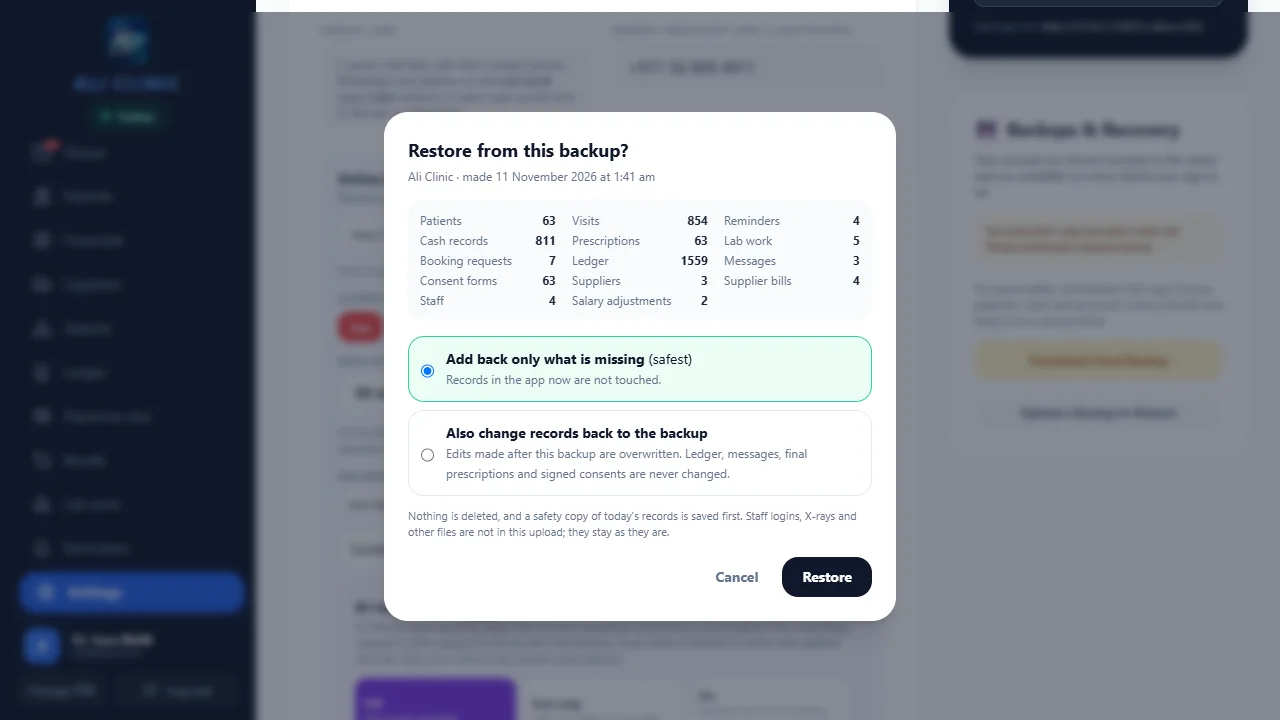
Review the backup and restore guide with the administrator. Clarify which structured records are included, how uploaded media are handled and which restore choices can change existing data. A restore should be a supervised recovery action, not an informal way to inspect an unfamiliar file. Agree where the clinic stores its downloads and who can access them.
During the early handover period, review recurring questions and update the team’s short working instructions. Keep the accepted migration scope and unresolved exceptions with the setup record. When requesting support, describe the task and observed result without sharing unnecessary patient details. For a migration discussion, contact the team with the source format, approximate scope and a redacted sample so the next step can be properly assessed.
How should backups and handover be checked?
Confirm who downloads backups, where they are stored and who may use the restore controls. A downloaded file should be part of an understood recovery process; confirm its coverage and test the documented workflow under administrator supervision.
Read the Clinic Flow backup and restore guide for file coverage, restore choices and protected records. Do not assume that a backup includes every hosted media file or that a restore is a harmless way to inspect data. Ask about data and staff access during setup.
Use the 14-day core trial for a rehearsal and staff questions. Setup and staff guidance are included, while large migrations are separately quoted. Keep original records according to the clinic’s applicable obligations and agreed retention arrangements; this guide does not set a retention period.
Common questions
Do we have to scan all old paper files before starting?
Not necessarily. Agree the active-record and archive scope with the clinic’s responsible team. Confirm how staff will find older information when needed before switching.
Is a large migration included in the core subscription?
Large data migrations are quoted separately after a sample review. Setup and staff guidance are included; confirm the exact migration work in writing.
Who should approve opening balances?
An authorised clinic team member should compare them with the source financial records and resolve differences before the new balances are used for collections.
Product references & further reading
Published by Ali Clinic Flow, the product provider. These are operational guides, not independent product rankings or clinical advice. Product facts reflect the publication date; confirm current scope and prices with the team.
Your next step
Plan the move before the first login.
Bring a redacted sample and describe the records you want to move. Setup guidance is included; large migrations are quoted separately.
Discuss setup and migration See the 14-day core trial guide